
Introduction
Building a modern computer in 2025 requires more than a powerful processor and graphics card. Heat management has become one of the most important factors for performance, stability, and hardware lifespan. New CPUs and GPUs are faster than ever, but they also generate significant heat during gaming, editing, streaming, and multitasking. Without proper cooling, even premium hardware can suffer from lower performance and long-term damage.
Cooling systems for PCs are designed to control temperatures and maintain stable airflow inside the case. Whether you are building a gaming PC, workstation, or compact home setup, choosing the right cooling solution can improve efficiency and reduce unwanted noise. In 2025, users have access to advanced air coolers, improved liquid cooling systems, smarter fan controls, and compact thermal solutions that fit almost every budget.
Many beginners believe cooling is only necessary for high-end gaming systems. However, every computer benefits from proper temperature control. Overheating can reduce frame rates, slow down processing speeds, and shorten the life of expensive components. A reliable cooling setup also helps maintain consistent performance during long gaming sessions or heavy workloads.
This guide explains the best cooling systems for PCs in 2025 builds, including different types of cooling, installation steps, advantages, disadvantages, common mistakes, and expert recommendations for beginners and intermediate PC builders.
What is Cooling Systems for PCs?
Cooling systems for PCs are hardware solutions that remove excess heat from computer components. The main goal is to keep processors, graphics cards, storage drives, and other parts operating within safe temperature ranges. These systems improve stability, reduce thermal throttling, and protect components from overheating.
Modern cooling systems for PCs usually include fans, heatsinks, thermal paste, liquid cooling pumps, and airflow management. Some systems focus on simple airflow using air coolers, while others use liquid cooling for higher thermal efficiency. Each option serves different needs depending on the performance level and budget of the build.
Air cooling remains one of the most common solutions because it is affordable, easy to install, and reliable. Liquid cooling, on the other hand, offers improved heat transfer and cleaner aesthetics for advanced gaming PCs. In 2025, hybrid cooling options are also becoming popular among enthusiasts who want maximum performance with lower noise levels.
Why is Cooling Systems for PCs Important?
A powerful computer creates heat whenever it processes data. Gaming, video editing, 3D rendering, and multitasking can quickly raise internal temperatures. If the system cannot remove this heat efficiently, performance drops become noticeable.
Cooling systems for PCs are important because they help maintain stable operating temperatures. Proper cooling prevents thermal throttling, a process where the CPU or GPU automatically reduces speed to avoid overheating. Stable temperatures also improve gaming performance and system responsiveness.
Another important reason is hardware longevity. Components exposed to high temperatures for long periods may wear out faster. A quality cooling setup protects expensive parts and reduces the risk of sudden shutdowns or crashes.
Good cooling also improves user comfort. Modern cooling systems in 2025 are quieter and more efficient than older designs. Smart fan curves and advanced liquid cooling systems reduce noise while maintaining excellent airflow. This balance creates a smoother computing experience for gamers and content creators.
Detailed Step-by-Step Guide
Step 1: Understand Your Cooling Needs
Before buying cooling hardware, determine how the PC will be used. Entry-level office computers usually require basic airflow with stock coolers. Gaming PCs, streaming setups, and editing workstations need more advanced cooling systems for PCs.
Consider the processor, graphics card, case size, and room temperature. High-performance components generate more heat and require stronger airflow or liquid cooling.
Step 2: Choose Between Air Cooling and Liquid Cooling
Air cooling uses fans and heatsinks to remove heat from components. It is cost-effective, easy to maintain, and highly reliable. Large tower coolers in 2025 offer excellent thermal performance with low noise levels.
Liquid cooling uses coolant, pumps, and radiators to transfer heat away from the CPU or GPU. All-in-one liquid coolers are popular because they combine performance and attractive design. Custom liquid loops provide maximum cooling but require more maintenance and experience.
For most users, high-quality air cooling is enough. Liquid cooling is recommended for overclocking, demanding workloads, or premium gaming systems.
Step 3: Select the Right PC Case
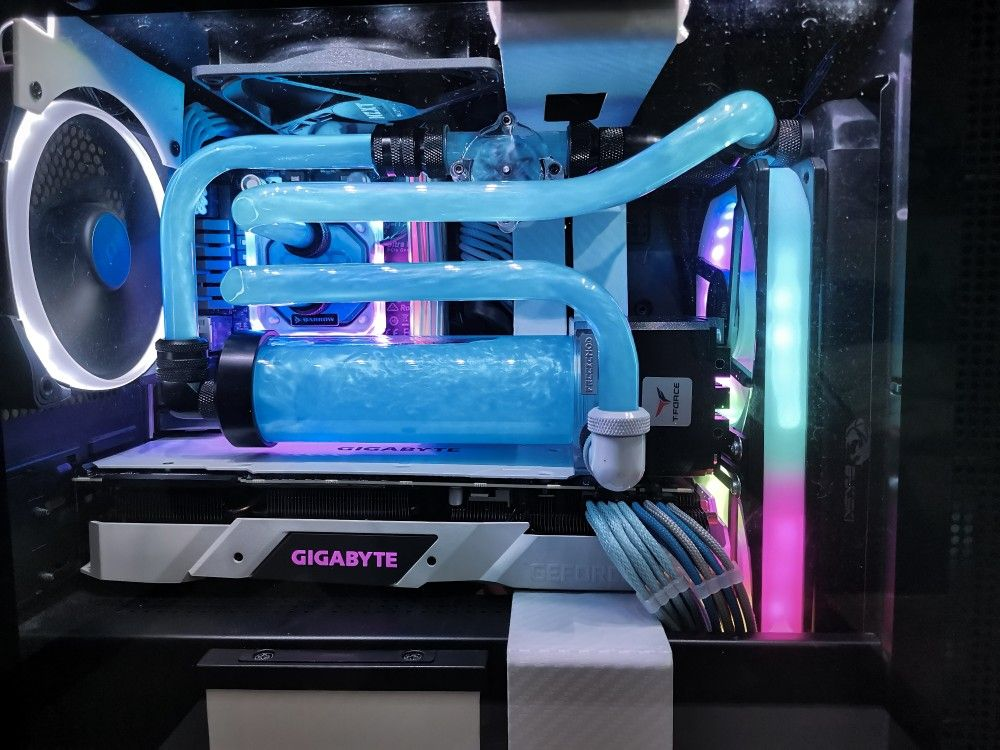
The PC case plays a major role in airflow efficiency. A poorly ventilated case can trap heat inside the system. In 2025, many modern cases include mesh front panels, larger fan support, and improved cable management.
Choose a case with enough space for airflow and future upgrades. Compact cases look stylish, but they often require careful cooling planning because of limited airflow.
Step 4: Install High-Quality Case Fans
Case fans improve airflow by moving cool air into the system and pushing hot air out. A balanced airflow setup is important for stable temperatures.
Most builds perform well with:
- Two front intake fans
- One rear exhaust fan
- Optional top exhaust fans
Larger fans usually produce less noise while moving more air. In 2025, PWM fans with smart speed control are highly recommended because they automatically adjust based on temperature levels.
Step 5: Apply Thermal Paste Correctly
Thermal paste improves heat transfer between the CPU and the cooler. Applying too much or too little paste can reduce cooling efficiency.
Clean the CPU surface carefully before installation. Apply a small amount of thermal paste in the center of the processor. Once the cooler is mounted, the pressure spreads the paste evenly.
Many beginners make mistakes during this step, but proper application can improve temperature performance significantly.
Step 6: Organize Cables for Better Airflow
Cable management is often ignored, yet it directly affects airflow inside the PC case. Loose cables can block fans and trap heat around important components.
Use cable ties and routing channels to keep the interior clean. Better airflow allows cooling systems for PCs to work more efficiently while improving the overall appearance of the build.
Step 7: Monitor Temperatures Regularly
After building the PC, monitor temperatures using trusted software tools. Idle CPU temperatures should remain stable, while gaming temperatures should stay within safe ranges recommended by the manufacturer.
If temperatures become too high, improve airflow, adjust fan curves, or upgrade the cooling system. Regular monitoring helps detect issues before they damage components.
Benefits of Cooling Systems for PCs
Cooling systems for PCs provide several important benefits for modern computer builds:
- Improves gaming and multitasking performance
- Prevents overheating and thermal throttling
- Extends the lifespan of hardware components
- Reduces system crashes and instability
- Maintains stable CPU and GPU temperatures
- Supports safe overclocking performance
- Improves airflow inside the PC case
- Creates a quieter computing experience
- Protects expensive components from heat damage
- Enhances long gaming and editing sessions
Disadvantages and Risks
Although cooling systems for PCs are essential, some solutions have disadvantages and risks that users should understand:
- Liquid cooling systems can be expensive
- Custom loops require regular maintenance
- Cheap fans may create excessive noise
- Poor installation can reduce cooling efficiency
- Low-quality thermal paste may dry out quickly
- Small cases can limit airflow options
- Dust buildup reduces long-term performance
- Liquid cooling leaks, while rare, may damage hardware
Understanding these risks helps users make smarter decisions when selecting cooling hardware for 2025 builds.
Common Mistakes to Avoid
Many beginners invest in expensive components but ignore airflow planning. This often causes overheating and unstable performance. Avoiding common cooling mistakes can save money and improve reliability.
One major mistake is buying a powerful CPU without upgrading the stock cooler. High-performance processors usually require better cooling systems for PCs, especially for gaming and heavy workloads.
Another common issue is incorrect fan placement. Intake and exhaust fans should work together to create balanced airflow. Installing too many exhaust fans can create negative pressure and attract dust inside the case.
Cable clutter is another problem. Poor cable management blocks airflow and increases temperatures. Keeping cables organized improves both cooling and appearance.
Many users also forget to clean their systems regularly. Dust buildup inside fans and heatsinks reduces airflow over time. Cleaning the PC every few months helps maintain consistent cooling performance.
Using cheap thermal paste or applying it incorrectly can also reduce heat transfer. Quality thermal paste and proper installation improve cooling efficiency significantly.
Finally, some builders choose cooling systems based only on appearance. RGB lighting and stylish designs look attractive, but thermal performance should always remain the top priority.
FAQs
What is the best cooling system for gaming PCs in 2025?
The best cooling system depends on the hardware and budget. High-end gaming PCs benefit from liquid cooling, while mid-range systems perform well with premium air coolers and balanced airflow.
Are air coolers better than liquid coolers?
Air coolers are more affordable, reliable, and easier to maintain. Liquid coolers provide better heat management for demanding workloads and overclocking. Both options work well when chosen correctly.
How many fans should a gaming PC have?
Most gaming PCs perform efficiently with at least three fans. Two intake fans at the front and one exhaust fan at the rear create balanced airflow for stable temperatures.
Does liquid cooling require maintenance?
All-in-one liquid coolers require minimal maintenance. Custom liquid cooling loops need regular cleaning, coolant replacement, and leak inspections to maintain performance.
Can overheating damage PC components?
Yes, continuous overheating can reduce hardware lifespan and cause performance issues. Proper cooling systems for PCs help prevent thermal damage and improve reliability.
Is thermal paste necessary for CPU cooling?
Thermal paste is essential because it improves heat transfer between the CPU and the cooler. Without it, temperatures can rise quickly under heavy workloads.
Are RGB cooling fans worth buying?
RGB fans are useful if they also provide strong airflow and low noise levels. Appearance should never replace cooling performance when selecting PC fans.
Expert Tips and Bonus Points
Choose cooling systems for PCs based on actual performance needs instead of marketing claims. A balanced airflow setup often performs better than expensive cooling hardware installed incorrectly.
Invest in high-quality fans from trusted brands. Reliable fans last longer, create less noise, and improve overall cooling efficiency. In 2025, many advanced fans include smart sensors and automatic speed adjustment features.
Always check cooler compatibility before purchasing. Large air coolers and radiators may not fit every case or motherboard layout. Reading specifications carefully prevents installation issues later.
Positive air pressure is recommended for most builds because it helps reduce dust accumulation. This setup uses slightly more intake airflow than exhaust airflow.
Gamers who plan to upgrade in the future should choose larger cases with flexible cooling support. Extra fan mounts and radiator space make future improvements easier.
Replacing stock thermal paste after a few years can also improve temperature performance. Even high-quality paste gradually loses efficiency over time.
Finally, keep the PC in a well-ventilated room. Ambient room temperature affects overall cooling performance more than many users realize.
Best Cooling Solutions for Different PC Builds
Choosing cooling systems for PCs becomes easier when users match the solution with the type of computer they plan to build. Different setups generate different heat levels, so cooling requirements also change.
Entry-Level Home and Office PCs
Basic home and office computers usually do not require expensive cooling hardware. Most processors in this category work well with stock coolers and one or two quality case fans.
Recommended features include:
- One front intake fan
- One rear exhaust fan
- Basic tower air cooler
- Dust filters for cleaner airflow
These systems stay quiet, affordable, and energy efficient while maintaining safe temperatures during daily tasks.
Mid-Range Gaming PCs
Mid-range gaming systems require stronger cooling because modern games place heavy stress on CPUs and GPUs. Builders should focus on balanced airflow and premium air coolers.
Recommended cooling options include:
- Mesh-front airflow case
- Two or three intake fans
- One or two exhaust fans
- High-performance tower air cooler
- PWM fan control support
This setup delivers stable gaming performance without spending too much money on advanced liquid cooling hardware.
High-End Gaming and Streaming PCs
High-end gaming systems with flagship graphics cards generate large amounts of heat. Streaming, multitasking, and content creation also increase thermal load.
Recommended solutions include:
- 240mm or 360mm liquid cooler
- Multiple intake and exhaust fans
- Spacious case with strong airflow
- Dedicated GPU cooling support
- Advanced fan curve customization
These cooling systems for PCs help maintain low temperatures during long gaming and streaming sessions.
Compact Mini ITX Builds
Small form factor PCs are popular in 2025 because they save desk space and look modern. However, compact systems often struggle with airflow because components are placed very close together.
Builders should select compact coolers designed specifically for smaller cases. Low-profile air coolers and slim liquid cooling radiators work best in these environments.
Proper cable management is especially important in Mini ITX builds because limited space can quickly block airflow.
Air Cooling vs Liquid Cooling Comparison
Both cooling methods are effective, but they serve different needs. Understanding the differences helps builders choose the best solution.
Air Cooling Advantages
Air cooling remains popular because it is practical and dependable. Large heatsinks and improved fan technology have made modern air coolers more powerful than ever.
Advantages include:
- Lower cost
- Easy installation
- Minimal maintenance
- Long lifespan
- Reliable operation
- Lower risk of hardware damage
Premium air coolers in 2025 can even compete with some liquid cooling systems for thermal performance.
Liquid Cooling Advantages
Liquid cooling provides faster heat transfer and cleaner aesthetics. Many gaming enthusiasts prefer liquid cooling because it keeps temperatures lower during heavy workloads.
Advantages include:
- Better cooling under pressure
- Cleaner internal appearance
- Lower CPU temperatures
- Reduced thermal throttling
- Excellent support for overclocking
Modern all-in-one liquid coolers are also easier to install than older custom loop systems.
Which Option is Better?
There is no universal answer because every build is different. Budget users usually benefit more from air cooling, while enthusiasts and content creators may prefer liquid cooling for advanced thermal performance.
The best cooling systems for PCs are the ones that match the performance level of the hardware without unnecessary overspending.
Signs Your PC Cooling Needs Improvement
Many users ignore early overheating signs until performance problems become severe. Identifying warning signs early can prevent expensive hardware issues.
Common signs include:
- Loud fan noise during simple tasks
- Sudden frame rate drops while gaming
- Random system shutdowns
- Hot air trapped inside the case
- Slow performance during multitasking
- High CPU or GPU temperatures
- Frequent thermal throttling warnings
If these problems appear regularly, improving airflow or upgrading cooling hardware may solve the issue quickly.
Future Trends in PC Cooling for 2025
Cooling technology continues to improve every year. In 2025, manufacturers are focusing on quieter operation, smarter controls, and better thermal efficiency.
AI-powered fan control systems are becoming more common. These systems automatically adjust cooling based on workload patterns and internal temperatures.
Manufacturers are also creating more eco-friendly cooling components with lower power consumption. Efficient fans and pumps reduce electricity usage while maintaining excellent performance.
Another growing trend is hidden cable design. Many modern cases now include rear-mounted connectors and cleaner layouts that improve airflow naturally.
Advanced vapor chamber cooling is also appearing in premium gaming PCs. This technology spreads heat more evenly across components for improved thermal control.
As gaming and professional workloads continue to demand more power, cooling systems for PCs will become even more important for future computer builds.
Maintenance Checklist for Better Cooling
Regular maintenance keeps cooling systems for PCs performing efficiently over time. Clean dust filters every few weeks to maintain strong airflow. Inspect fans for unusual noise or vibration because damaged bearings can reduce cooling performance. Check cable placement after hardware upgrades to ensure airflow paths remain clear. Replace worn thermal paste every few years for stable CPU temperatures. Users with liquid cooling should inspect pumps and tubing regularly for signs of wear. Keeping the computer away from walls and enclosed spaces also improves ventilation. Simple maintenance habits reduce overheating risks, improve long-term stability, and help expensive gaming or workstation hardware operate at peak performance throughout daily use and demanding workloads. Consistent airflow management also helps maintain quieter operation during extended gaming sessions.
Conclusion
Cooling systems for PCs are no longer optional for modern computer builds. In 2025, processors and graphics cards deliver incredible performance, but they also generate significant heat. Without proper cooling, even powerful systems can experience reduced performance, instability, and shorter hardware lifespan.
Choosing the right cooling setup depends on budget, performance goals, and case size. Air cooling remains an excellent choice for most users because it is affordable, reliable, and easy to install. Liquid cooling offers advanced thermal performance and cleaner aesthetics for high-end gaming and workstation builds. Both solutions can provide excellent results when combined with balanced airflow and proper maintenance.
Good cooling also improves the overall user experience. Lower temperatures reduce thermal throttling, maintain stable frame rates, and create quieter operation during gaming or demanding tasks. Simple upgrades such as better fans, organized cable management, and quality thermal paste can make a noticeable difference.
Beginners should focus on airflow balance and reliable components rather than expensive features alone. Experienced builders can explore advanced liquid cooling and performance tuning for even better results.
As computer hardware continues to evolve, cooling systems for PCs will remain essential for achieving stable performance and protecting valuable components. Investing in the right cooling solution today ensures a faster, quieter, and more reliable PC build for years to come.